

Only Skills in the Published state appear in the public Marketplace. A Skill in Ready has passed review but still requires a merchant to publish it.
Publishing lifecycle
1
Prepare the package
Create a ZIP package that contains the current
SKILL.md, then prepare the Skill name, version, category, and marketplace summary.2
Upload and submit
Upload the ZIP package from the Dashboard. Clink checks the package and submitted marketplace information.
3
Review the result
A successful review moves the Skill to Ready. If the review fails, use the failure details to fix the package and upload it again.
4
Publish
Review the public content, then select Publish to make the Skill visible in the public Marketplace.
Status reference
Before you begin
Merchants do not enter or edit the public CLI command or installation Prompt. Clink generates both from the reviewed Skill package and displays them as read-only installation methods.
Publish a Skill
Prepare the package
Before uploading, confirm that:- The ZIP package opens successfully and contains
SKILL.md. - The version declared in
SKILL.mdexactly matches the version you plan to submit. - The summary explains what the Skill does and who should use it.
- The package contains enough accurate instructions for Clink to generate its installation methods.
- Payment-trigger and user-confirmation behavior is clear if the Skill uses Agent Payment.
- The required tip payment handler is present if you plan to enable Tips.
Submit the Skill
1
Open Skill Marketplace
Sign in to the Clink Dashboard and go to Developers > Skill Marketplace. Select Upload skill.
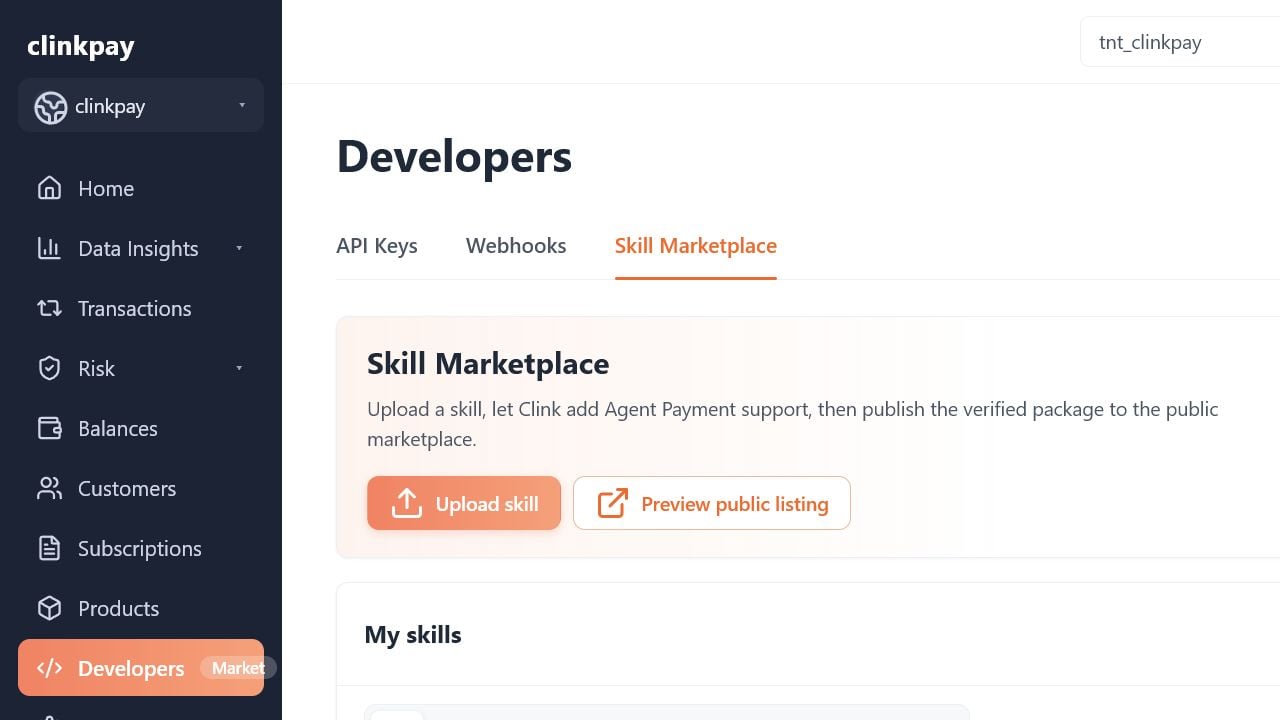
Skill Marketplace
Skill Marketplace
2
Select the ZIP package
Choose the package you want to submit. Clink checks the ZIP structure and
SKILL.md during review.3
Complete the listing
Enter the public marketplace information.
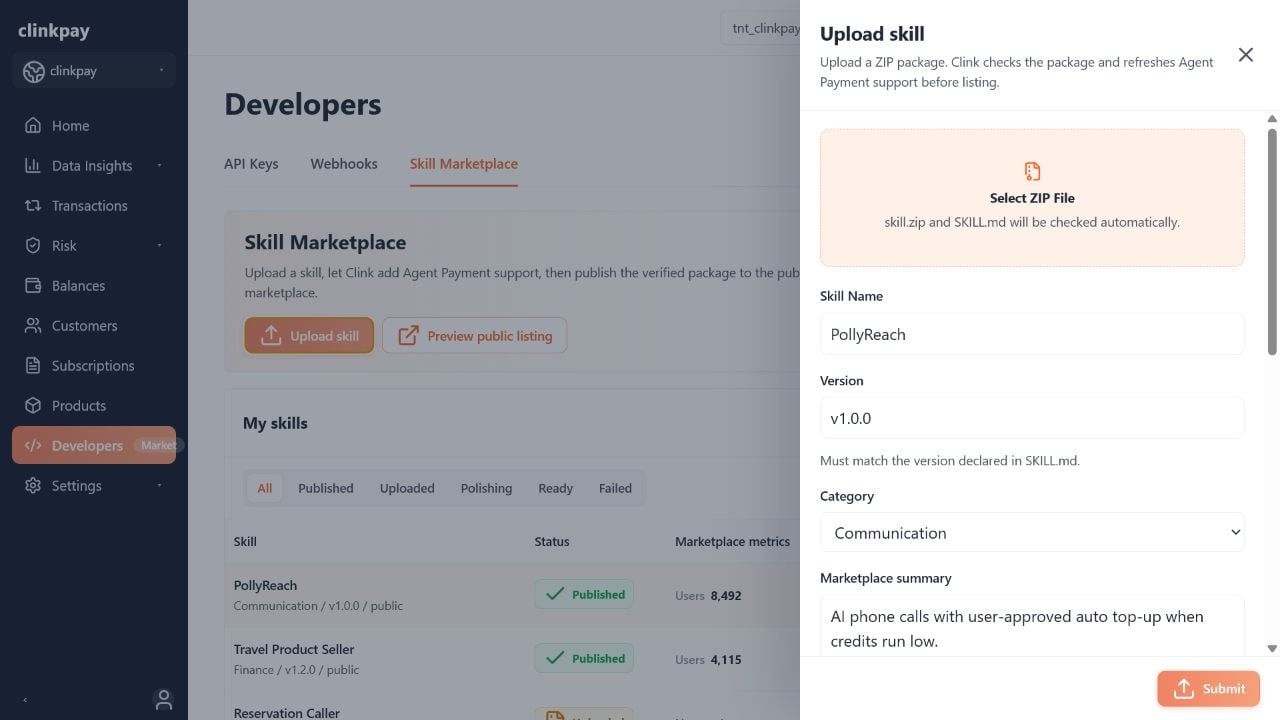
Upload form
Upload form
4
Configure Tips (optional)
Enable Tips only when the Skill supports the required tip payment flow. Add suggested amounts and a public note, then submit the package.
5
Wait for review
Follow the status in My skills. The review can include version comparison, package schema, security, and Agent Payment checks. Clink also generates the public CLI command and Prompt from the reviewed package.
Review and publish
When the Skill reaches Ready:- Select View and check the submitted listing, generated installation methods, overview cards, Tips configuration, and version information.
- Use Preview public listing to review how the publisher’s Skills appear in the public Marketplace.
- Return to My skills and select Publish.
Manage a published Skill
Public Marketplace presentation
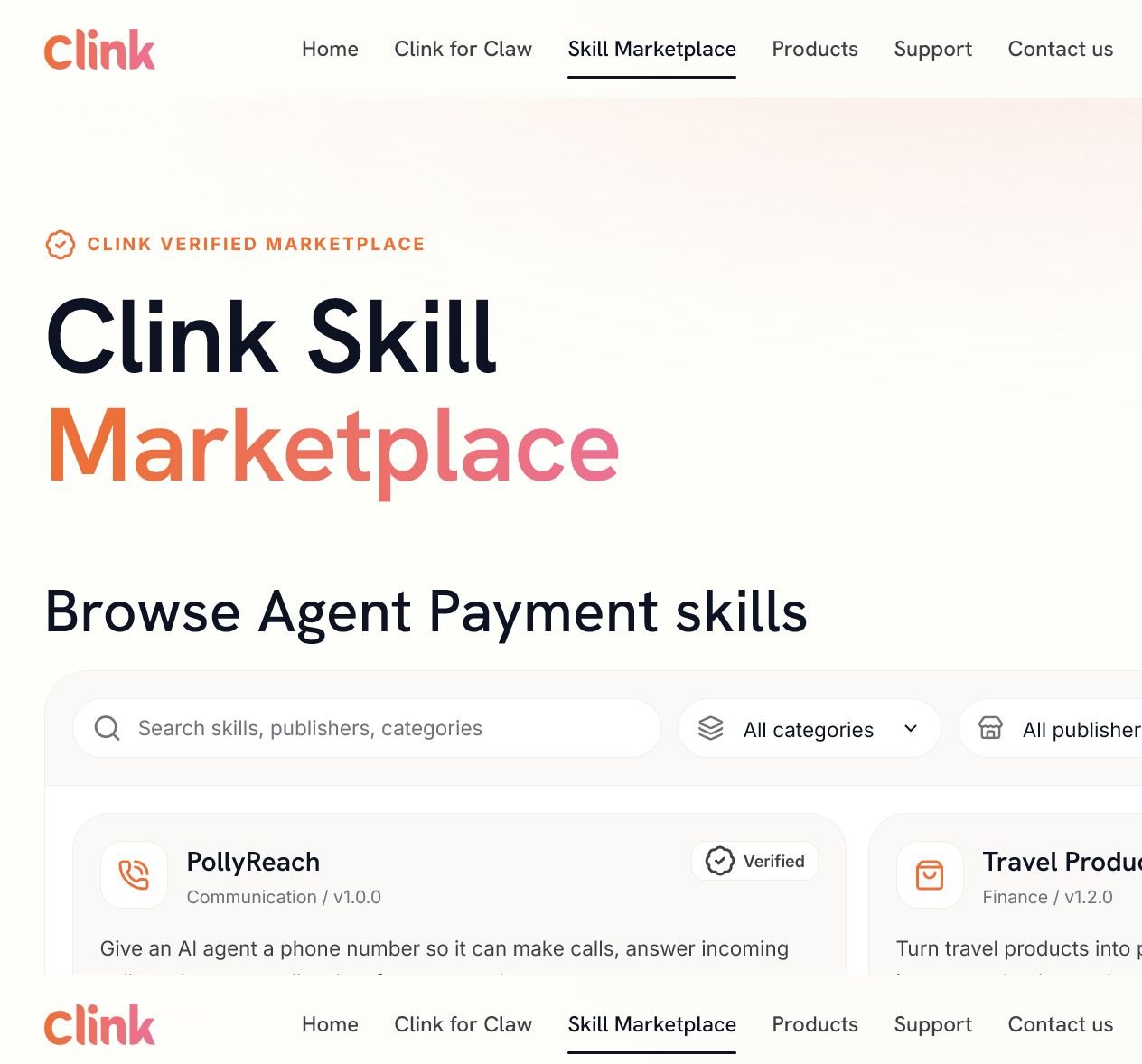
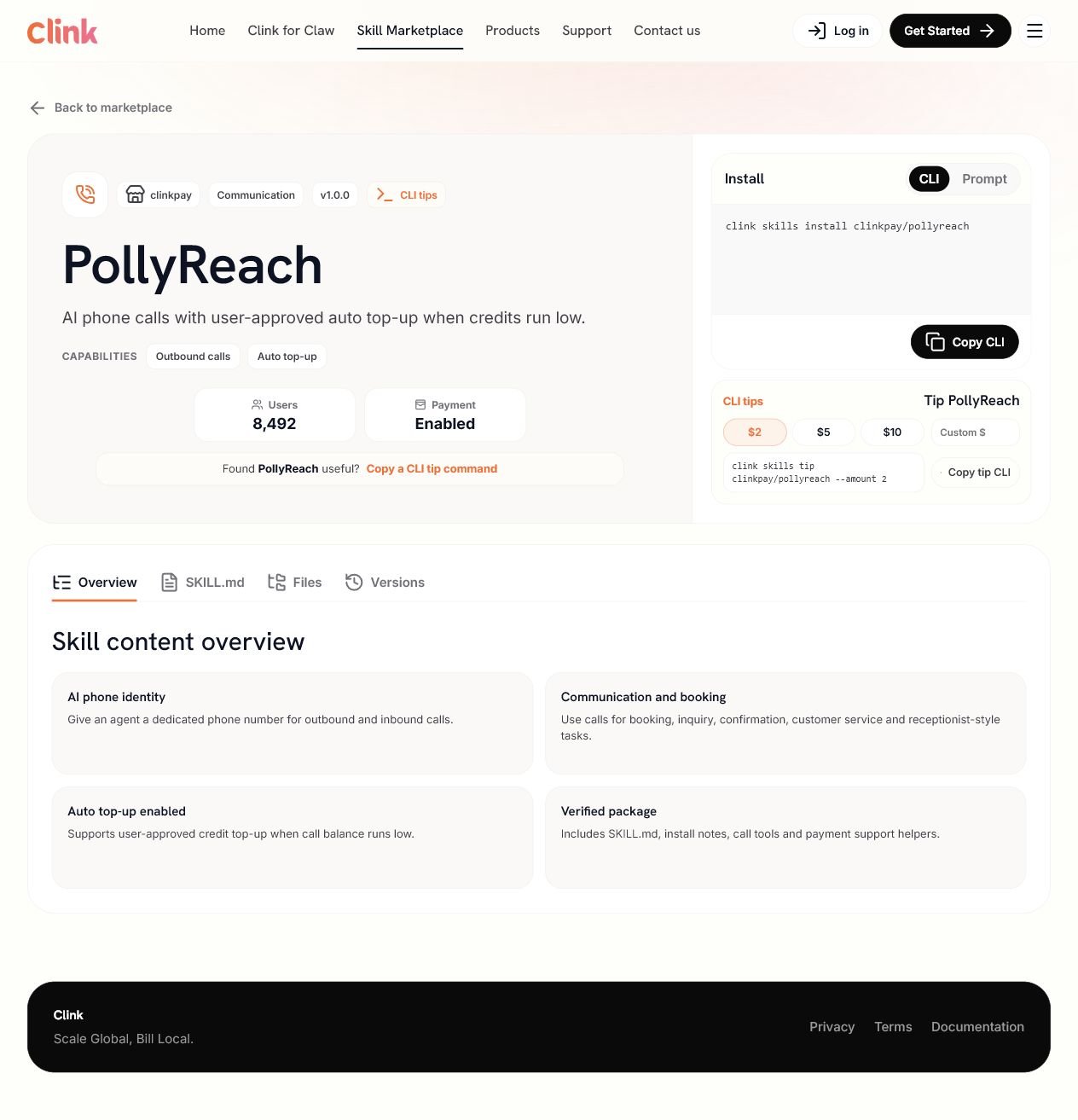
The public list contains only Published Skills. A list card can include the Skill name, category, current version, summary, capabilities, publisher, Users metric, verification badge, generated installation Prompt, and an eligible CLI tips label. The public detail page can include the listing metadata, generated CLI and Prompt installation methods, overview cards,SKILL.md, package files, version history, and eligible Tips content.
Public Marketplace list
Public Marketplace list
Public Skill detail
Public Skill detail
Review and maintain content
Select View for a Skill to inspect its listing.Submit a version update
You can submit an update for a Ready or Published Skill.1
Prepare the new package
Update the Skill files and
SKILL.md, then create a new ZIP package.2
Open the update form
Open the Skill details and select Submit update.
3
Enter the version information
Enter a version that is newer than the current version and matches
SKILL.md. Add a concise version note for the version timeline.4
Submit for review
Review the listing and Tips configuration, then submit the package. Clink reviews the new package and regenerates its CLI command and Prompt.
Unpublish a Skill
Select Unpublish for a Published Skill to remove it from the public Marketplace. The Skill remains available in the merchant Dashboard, where the current status and available actions indicate whether it can be published again.Handle Skill payment webhooks
Some Marketplace Skills require users to purchase additional credits before they can continue. After Clink completes the recharge order, the merchant webhook must apply the result to the merchant account and return the corresponding account response.Before a merchant enters this flow, Clink Marketplace has already registered the order-event webhook and prepared the required webhook configuration. Merchants do not create or update the endpoint, manually change event subscriptions, or manage signing-secret rotation. This section covers only the webhook handler logic that the merchant server must implement.
Successful payment event
When the event type isorder.succeeded, reconcile the order, find the merchant account by data.object.customerEmail, apply the successful recharge, and return HTTP 200 with account.reloaded or account.created.
Secure processing sequence
1
Verify the webhook
Verify
X-Clink-Timestamp, X-Clink-Signature, and X-Clink-SignType against the raw request body before reading or acting on the event. Reject requests with an invalid signature.2
Deduplicate and reconcile the order
Prefer the event
id as the idempotency key and store the original response for retries. If the merchant also stores merchantReferenceId and sessionId, match both when both are present and quarantine mismatches instead of applying credits.3
Confirm recharge success
Continue to account resolution only when the event type is
order.succeeded. Use data.object.customerEmail to identify the merchant account.4
Resolve the merchant account
If the email belongs to a user already registered with the merchant, apply the recharge once and prepare
account.reloaded. If no account exists, the merchant first creates the user account, applies the purchased credits as its initial recharge, and prepares account.created.5
Commit and respond
Commit the local order state, account creation or recharge, and idempotency record before returning HTTP
200. A retry must return the same stored response without creating another account or applying credits again.Account response fields
The same response is also documented under Response at the bottom of the order webhook reference.Retry and ordering requirements
- Process the same event more than once without duplicating account creation or credits.
- Store the response associated with the event and return it again for duplicate deliveries.
- Tolerate out-of-order deliveries and apply the recharge only after processing a valid
order.succeededevent. - Use a unique merchant-account constraint for normalized customer email so concurrent deliveries cannot create duplicate users.
- Record the order ID, event ID, resolved merchant user ID, applied amount and currency, and final account response for audit and recovery.
Resolve review failures
A Skill enters Failed when one or more review checks do not pass. Failed Skills remain private and are not available in the public Marketplace.Read the review feedback
Fix and reupload
1
Locate the issue
Use Failed check and Detected in to find the affected file or configuration.
2
Apply the recommended fix
Update the package using the review feedback. If payment behavior is involved, make the trigger and user-confirmation logic explicit and verifiable.
3
Check the package again
Confirm that the ZIP opens, includes the current
SKILL.md, and uses the same version in the package and submission form.4
Reupload
Select Reupload, choose the corrected ZIP package, and submit it for another review.
Publication checklist
Package and technical content
- The ZIP package opens successfully and contains
SKILL.md. - The submitted version matches the version declared in
SKILL.md. - The package contains accurate content for Clink to generate the CLI command and Prompt.
- Agent Payment behavior is clear and reviewable when used.
- A reviewable tip payment handler is present when Tips are enabled.
Marketplace content
- The Skill name is concise and recognizable.
- The category supports accurate discovery.
- The summary explains the Skill’s main outcome.
- Generated installation methods were reviewed as part of the listing preview.
- Overview cards describe real capabilities and prerequisites.
- A version note is included for an update.
Before publishing
- The Skill status is Ready.
- The listing, generated installation methods, overview content, Tips, and version information were reviewed.
- The public listing preview was checked.
- Publish is selected only after the public content is ready.
Frequently asked questions
Why is my Skill missing from the public Marketplace?
Why is my Skill missing from the public Marketplace?
Only Published Skills appear publicly. Uploaded, Polishing, Ready, and Failed Skills remain private. A Ready Skill still needs to be published by the merchant.
Can I edit the generated CLI command or Prompt?
Can I edit the generated CLI command or Prompt?
No. Clink generates both installation methods from the reviewed package. Correct the relevant package content and submit a new version when the generated result needs to change.
Why is the Tips panel missing?
Why is the Tips panel missing?
Tips must be enabled by the merchant and pass the related Clink check before the public CLI tips content is displayed.
Can I update the version only in the form?
Can I update the version only in the form?
No. The submitted version must match the version declared in the package’s
SKILL.md. An update must also use a version newer than the current one.Can I edit content after publishing?
Can I edit content after publishing?
Overview cards and Tips configuration can be maintained from the Skill details. Package or generated installation-method changes should be submitted as a new version for review.
Review timelines, marketplace fees, settlement, revenue sharing, and refund policies are not defined by this guide. Use the latest Clink commercial terms or contact Clink support for current policy information.