> ## Documentation Index
> Fetch the complete documentation index at: https://docs.clinkbill.com/llms.txt
> Use this file to discover all available pages before exploring further.
# Currencies
> Enable customers to pay in their local currency
## Overview
[Checkout Session](/guides/payments/checkout_session) provides a unified hosted checkout experience with automatic local currency support. Clink handles all currency conversions and localizes prices without requiring additional configuration.
Offering local currency support provides several advantages:
* Higher conversion rates: Customers prefer to pay in familiar currencies
* Access to local payment methods: Many local payment methods only support their native currency
* Market-specific pricing: Implement competitive pricing strategies for different markets
* Cost reduction: Avoid foreign exchange fees that some payment providers charge customers
## Customer Experience
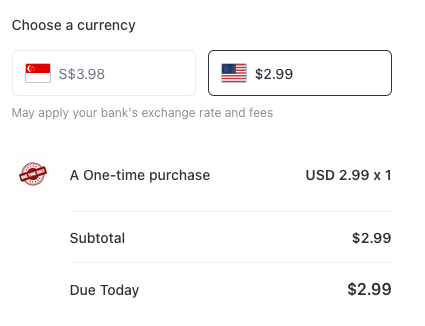
When customers access your checkout page from a location with a currency different from your defined price currencies, they'll see both their local currency and your default currency. Currency options are determined based on the customer's public IP address location.
If the customer's local currency matches one of your defined price currencies, only that currency will be shown.
 ## Pre-defined Local Currency Prices
Merchants can configure products with multiple local currencies to meet various business needs.
Clink allows you to set multiple currencies for a single **price**. To configure this, visit the [Multi-currency Pricing](/guides/resources/product#multi-currency-pricing) section on the product page.
## Pre-defined Local Currency Prices
Merchants can configure products with multiple local currencies to meet various business needs.
Clink allows you to set multiple currencies for a single **price**. To configure this, visit the [Multi-currency Pricing](/guides/resources/product#multi-currency-pricing) section on the product page.
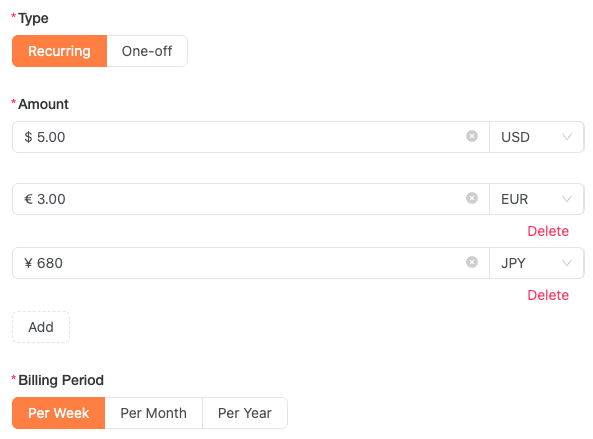 After configuration, simply use a **single Price ID** to create checkout sessions. Customers will automatically see your pre-defined price in their local currency, with no additional conversion needed.
**Subscription**: To support local currencies in recurring payments, you must configure them in advance through price settings. Adaptive pricing is not available.
**Settlement Currency**: For payments made in a pre-defined local currency different from your settlement currency, Clink automatically handles conversion during settlement.
After configuration, simply use a **single Price ID** to create checkout sessions. Customers will automatically see your pre-defined price in their local currency, with no additional conversion needed.
**Subscription**: To support local currencies in recurring payments, you must configure them in advance through price settings. Adaptive pricing is not available.
**Settlement Currency**: For payments made in a pre-defined local currency different from your settlement currency, Clink automatically handles conversion during settlement.
If a customer's local currency isn't included in your configuration, adaptive pricing will be used instead.
## Adaptive Pricing
As mentioned in the [Customer Experience](#customer-experience) section, customers will see their local currency alongside your default price currency. For multi-currency price, only the primary currency will be shown.
**Settlement Currency**: With adaptive pricing, orders settle in your primary price currency. Clink manages all customer-side currency conversions during payment processing.
### Restrictions
Adaptive Pricing is not available for:
* Subscription payments: Due to exchange rate fluctuations and the need for customer agreement on renewal amounts
* Sessions where the customer's currency is already covered by pre-defined price currencies
## API One-time Payments
When creating a [one-time payment](/api-reference/endpoint/create-payment) by API, use `paymentCurrency` for the currency you want to charge the customer in. If `paymentCurrency` is omitted, the payment uses the original pricing currency. For direct amount payments, `currency` is still required as the original pricing currency. For price-based payments, Clink uses the currency from the price.
Clink first uses a configured fixed multi-currency price when available. If no fixed price exists, Clink automatically converts the amount from the original pricing currency to the requested payment currency. The selected payment method must support the requested `paymentCurrency`.
```json Specify payment currency theme={null}
{
"customerId": "cus_xxxxx",
"productId": "prd_xxxxx",
"priceId": "price_xxxxx",
"paymentInstrumentId": "pi_xxxxx",
"paymentMethodType": "CARD",
"paymentCurrency": "HKD",
"returnUrl": "https://merchant.example.com/payment/return"
}
```
## Supported Currencies
Clink supports these major currencies:
| | | |
| :----------------------------------------------------------------------------------------------------------- | :------------------------------------------------------------------------------------------------------- | :-------------------------------------------------------------------------------------------------------- |
| United States Dollar (USD) | Euro (EUR) | Chinese Yuan (CNY) |
| Canadian Dollar (CAD) | Japanese Yen (JPY) | Australian Dollar (AUD) |
| Singapore Dollar (SGD) | Hong Kong Dollar (HKD) | South Korean Won (KRW) |
| British Pound (GBP) | UAE Dirham (AED) | Thai Baht (THB) |
| Indonesian Rupiah (IDR) | Philippine Peso (PHP) | Malaysian Ringgit (MYR) |
| Brazilian Real (BRL) | Indian Rupee (INR) | |